Free tool
Free Finnish Invoice Template
A simple, fillable Finnish invoice template online. Fill in the invoice below and save it as a PDF or download it as Excel. Your invoice is ready in a minute.
- No sign-up or email needed
- Made by an accounting firm
- Approved by an accountant
- Save as PDF or download Excel
Updated 11/2026. Finnish VAT rates from 1 January 2026.
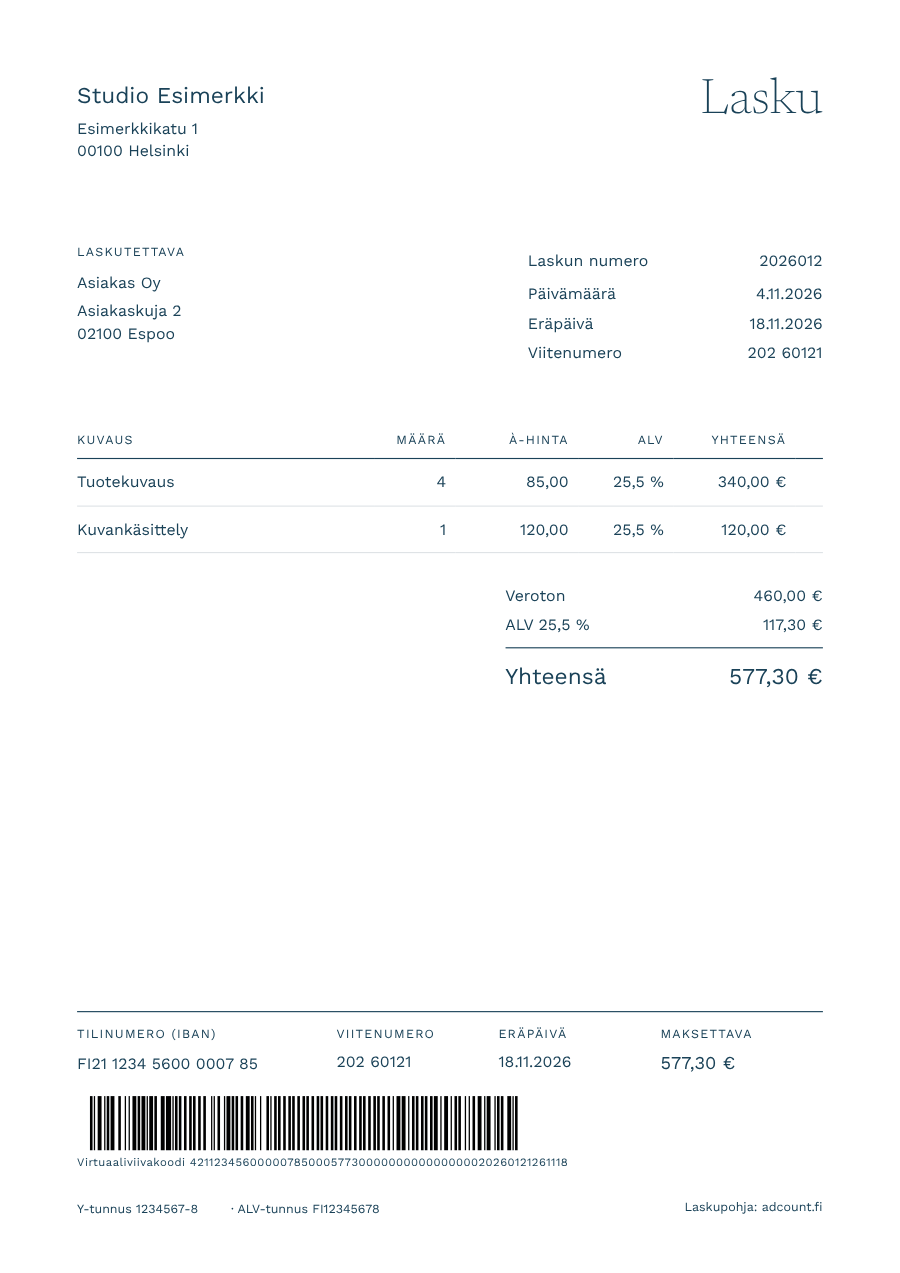
Type straight onto the invoice. Click any field and start typing. Totals, VAT and the reference number update as you go.
Invoice
| Invoice number | |
| Invoice date | |
| Due date | |
| Reference number | |
| Credited invoice | |
| Delivery date |
| Description | Qty | Unit price | VAT | Total |
|---|
The seller is not registered for VAT (Finnish VAT Act, section 3).
Free, no sign-up. Your details stay on your device. In the print window, choose Save as PDF as the printer.
Your invoice is ready
Remember to keep a copy for your bookkeeping. Want your bookkeeping to be just as easy? Get your own English-speaking accountant for a fixed monthly fee, with the financial statements included.
Get a QuoteWe reply within one business day.
Guide
How to create an invoice
- Type your details and your customer's details straight onto the invoice.
- Add the products or services you sold. The template calculates the totals, VAT and the Finnish reference number for you.
- Click Save PDF and choose Save as PDF as the printer, or download the invoice as Excel.
- Email the invoice to your customer or print it on paper.
The bottom of the invoice has the payment details of a traditional Finnish invoice and a bank barcode, so your customer can pay easily.
The template does not send e-invoices or store your invoices. Save each invoice yourself, as your invoices are part of your bookkeeping records. The template helps, but the seller is always responsible for the content of the invoice.
If your customer prefers Finnish, switch on Invoice in Finnish and the invoice labels change to Finnish. If an invoice has an error, switch on Credit note. Read more about making a credit note.
Excel
Invoice template in Excel
Want to edit your invoices on your own computer? Fill in the invoice above and click Download Excel to get the same invoice as an Excel file.
In the Excel invoice template, the totals, VAT and reference number are calculated with formulas, so you can reuse the template. The file also opens in Google Sheets and Numbers, which makes Excel handier than a Word invoice template.
Create an invoiceInvoice requirements
What must a Finnish invoice include?
There is no official invoice template in Finland, but the Finnish VAT Act sets out what an invoice must show. Our template includes all of it.
For invoices of 400 euros or less, simplified invoice details can usually be used. There are exceptions, so check your own situation with your accountant. A full invoice is always accepted.
- Invoice date and a sequential invoice number
- Seller's name, address and Business ID or VAT number
- Buyer's name and address
- What was sold, how much and when
- Net price, VAT rate and VAT amount
- Amount due, due date and account number
Small sole traders
Invoicing without VAT
A small business doesn't always have to register for VAT in Finland. The 20,000 euro threshold for small-scale business is based on turnover in both the current and the previous calendar year. You can also register for VAT voluntarily. Check your own situation with your accountant.
If you are not VAT registered, you don't add VAT to your invoices, and the invoice states that you are not registered for VAT.
Switch off VAT registered in the template, and the note is added to the invoice automatically.
VAT
Finnish VAT rates 2026
The VAT rate depends on what you sell. The reduced 14 % rate fell to 13.5 % on 1 January 2026.
| 25.5 % | Most goods and services |
|---|---|
| 13.5 % | Food, restaurant and catering services, accommodation, passenger transport, sports services, medicines and books |
| 10 % | Newspapers and magazines |
| 0 % | For example services sold to businesses in other EU countries and exports outside the EU. The invoice must state the reason. |
Choose the right rate for each line. When you choose 0 %, the template asks for the reason.
Credit note
Credit note: how to correct an invoice
A credit note (hyvityslasku in Finnish) cancels or corrects an invoice you have already sent, in full or in part. A sent invoice must not be deleted, so an error is always corrected with a credit note.
How to make a credit note. You can make a credit note with this template:
- Switch on Credit note in the template.
- Enter the number of the invoice you are crediting.
- Add the credited lines with the same prices and VAT rates as in the original invoice. The amounts turn negative automatically.
- Give the credit note its own sequential invoice number and send it to your customer.
Paying a credit note. A credit note is not paid. If your customer has not yet paid the original invoice, they pay only the difference or leave the invoice unpaid. If the invoice has already been paid, you refund the credited amount to your customer.
Credit notes and VAT. A credit note also corrects the VAT, so use the same VAT rate as in the original invoice. The credit reduces your VAT on sales for the tax period in which the credit is given.
Credit notes in bookkeeping. A credit note is a bookkeeping record like any other invoice, and it reduces your sales. If we do your bookkeeping, send the credit note to your accountant in the same way as your other sales invoices.
Invoicing software
Invoice template or free invoicing software?
Looking for free invoicing software? If you invoice only now and then, an invoice template is enough, and no sign-up is needed. Once you send more invoices, invoicing software saves time: it numbers your invoices, matches payments and sends payment reminders. With invoicing software, you can also send e-invoices, which many business customers in Finland require.
Invoicing software that suits a small business includes, for example, Holvi and Procountor Solo. We are a Holvi partner accounting firm, read more about Holvi accounting. We do your bookkeeping for the same fixed monthly fee whether you invoice with a template or with invoicing software.
Accounting
You invoice, we do the bookkeeping
Every invoice you send is a bookkeeping record. When we do your bookkeeping, you don't have to think about VAT returns, VAT rates or financial statements. You send your invoices and receipts to AdcountApp, and your own English-speaking accountant takes care of the rest. If you invoice in Holvi, the material is collected directly from there.
Adcount is an authorized accounting firm in Helsinki, founded in 2005 and specialised in accounting for small businesses.
Get a QuoteWe reply within one business day.
Prices excl. VAT. The fixed monthly fee is based on your number of transactions.
- Your own named accountant you can always ask
- Financial statements and tax return included, no separate annual invoice
- No software fees and no notice period
Get a Quote and Become a Client
Fill in the form and you will receive a detailed quote by email within one business day.
You can tell us about your business or ask about bookkeeping. We confirm the price and content of the service in the quote.
- Get a quick price estimate
- No sales calls
- No commitment
FAQ
Finnish invoice template: questions and answers
-
Is the invoice template free? Do I need to sign up?
The invoice template is free, and no sign-up or email address is needed. You create the invoice directly in your browser and save it as a PDF, or download it as Excel.
-
What is a Finnish reference number?
A reference number (viitenumero) helps you match payments to invoices. Your customer enters it when paying, instead of a message. The template creates a valid Finnish reference number from your invoice number automatically.
-
What is the virtual barcode?
A string of numbers your customer can paste into their online bank. The bank then fills in the account number, amount, reference number and due date. The template creates the virtual barcode and a printable bank barcode when the account number is Finnish.
-
Can I write my invoice in English?
Yes. A Finnish invoice can be in English. The Tax Administration may ask for a translation if needed. If your customer prefers Finnish, switch on Invoice in Finnish and the invoice labels change to Finnish.
-
How do I invoice a customer in another EU country?
When you sell services to a business in another EU country, you usually don't add Finnish VAT. Choose 0 % on the line, select Reverse charge as the reason and add the buyer's VAT number. If you are unsure, check with your accountant.
-
Can I make an invoice without a Business ID?
Yes, if you sell something occasionally, for example a used item: leave the Business ID empty and switch off VAT registered. If you work without a Business ID, the payer usually pays you as salary or a work compensation and withholds tax. If you invoice regularly, setting up a sole trader business is often the simplest option.
-
How do I correct an incorrect invoice?
A sent invoice must not be deleted, so the error is corrected with a credit note. Switch on Credit note in the template and enter the number of the original invoice. The title changes and the amounts turn negative. The credit note gets its own invoice number.
-
Is my invoice saved anywhere?
No. The invoice is created entirely in your browser, and nothing is sent to Adcount or anywhere else. If you choose Remember my details, your own business details are saved only in this browser.
Get a quote for accounting
We reply within one business day.